
2048 Cupcakes With Undo – Play Practice Mode
Welcome to 2048 Cupcakes With Undo – Play Practice Mode on Cupcake2048.com! Play 100% free unblocked online games with zero pop-up ads, no downloads, and full mobile touchscreen and keyboard controls. Master tile merging strategies and explore our high-score puzzle solvers.
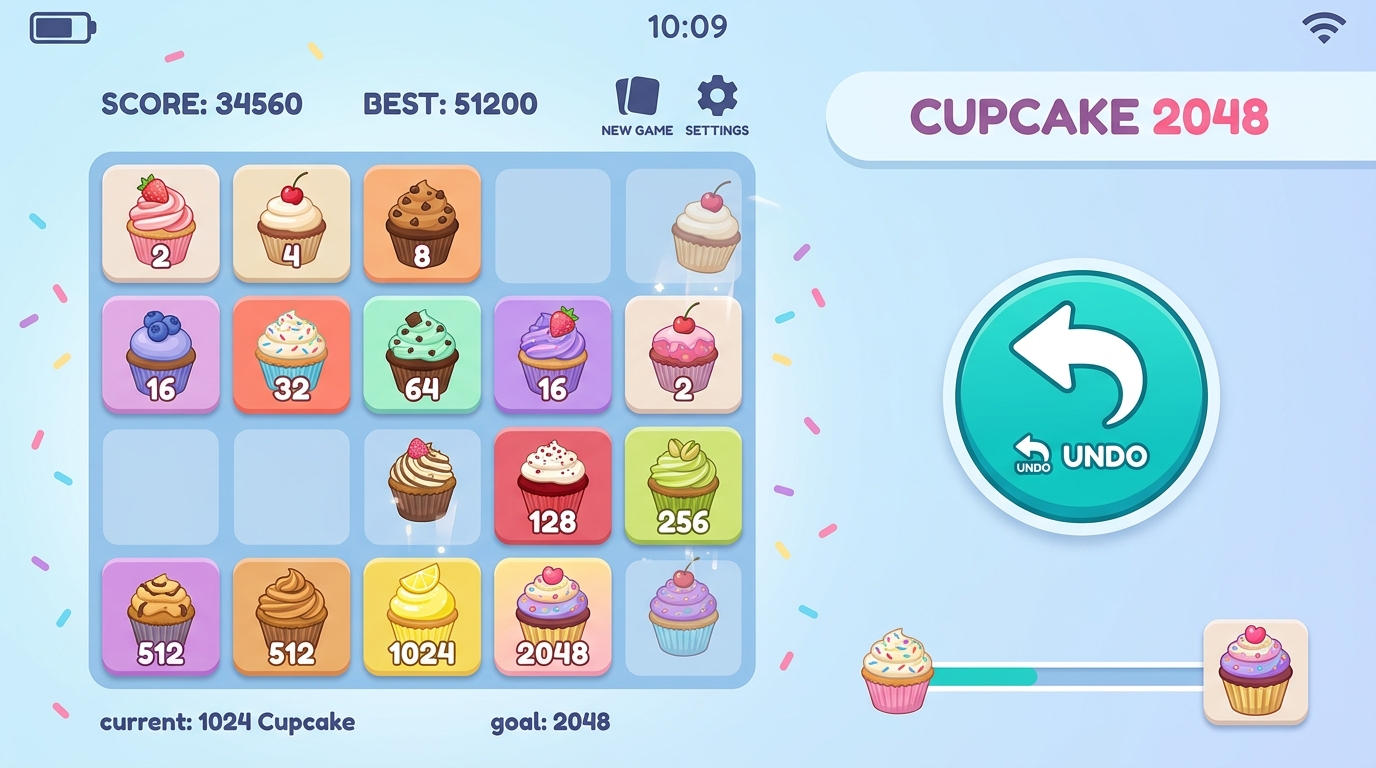
Welcome to 2048 Cupcakes With Undo practice mode! In standard 2048, a single accidental swipe can break your corner anchor and ruin a high-scoring run. Playing 2048 Cupcakes with Undo gives you a safety net to correct mistakes, test complex merge strategies, and learn tile management stress-free.
Merge matching cupcakes and reach 2048!
New GameHow to play: Use your arrow keys to move the tiles. When two tiles with the same symbol touch, they get promoted!
Tile Legend:
What Is 2048 Cupcakes With Undo Mode?
2048 Cupcakes with Undo is a specialized practice mode designed for players learning advanced puzzle strategies. In standard gameplay, moves are permanent. In Undo mode, players can retract unintended swipes, rewind board states, and test experimental merges without losing progress.
How the Undo Feature Works
The undo feature tracks your board state history step-by-step. When activated, it reverts your 4×4 grid layout, calorie score, and tile positions back to the previous turn, allowing you to select a better movement direction.
Using Undo Mode as a Learning Tool
Practice mode is ideal for sharpening your skills before competing for high scores in standard mode:
- Mastering Corner Anchors: Practice maintaining your highest tile in the bottom-right corner and learn how to recover if it shifts.
- Testing Descending Chains: Experiment with forming snake chains (2048 ➔ 1024 ➔ 512 ➔ 256) without fear of accidental game overs.
- Learning Grid Recovery: Practice clearing crowded upper rows when the board is 90% full.
Undo Mode vs Standard Cupcake 2048 Comparison
| Feature | Standard Competitive Mode | Practice Undo Mode |
|---|---|---|
| Move Permanence | Permanent (No Takebacks) | Step Back Last Move |
| Difficulty | High Discipline Required | Relaxed / Learning Mode |
| Grid Size | 4×4 Grid | 4×4 Grid |
| Score Tracking | Strict Kcal Record | Practice Score |
| Best Used For | High Score Competitions | Skill Development & Strategy |
Once you build confidence in practice mode, test your skills in strict competitive mode on our 2048 Cupcakes homepage.
2048 Cupcakes With Undo FAQ
Can I Undo Unlimited Moves?
Practice mode allows stepping back recent moves sequentially.
Does Undo Affect the Best Score?
Practice mode helps you build confidence before competing for high scores in standard mode.
Is Undo Available on Mobile Devices?
Yes, practice mode controls function smoothly on mobile browsers.
Where Can I Read Detailed Tactics?
Read our full guide on how to win 2048 Cupcakes for core corner tactics.
Play More Cupcake 2048 Games
- Original 2048 Cupcakes: Play the classic year-round cupcake puzzle game.
- How to Win Guide: Master advanced corner anchor strategies.
- 2048 Cupcakes Unblocked: Play on school or work networks.
Attribution: 2048 is an open-source project originally created by Gabriele Cirulli on GitHub under the MIT License.
Psychology of Learning with Practice Undo Mode
Playing 2048 Cupcakes with Undo mode fundamentally changes how players learn puzzle strategies. In strict competitive mode, the fear of making a game-ending mistake often leads players to play overly cautiously. In Undo practice mode, players feel empowered to test risky merge sequences, experiment with new corner positions, and observe how different swipe choices impact grid layout over 5 to 10 turns.
Transitioning from Practice to Competitive Play
Once you use Undo mode to internalize corner anchor maintenance and descending chain building, you will find that your decision-making in standard non-undo mode becomes intuitive, fast, and highly accurate!
How Practice Undo Mode Accelerates Skill Development
In strategic puzzle gaming, immediate feedback is the fastest way to build muscle memory. Playing 2048 Cupcakes with Undo mode gives you instant feedback on every swipe. If you execute a move that splits your descending tile chain or forces an unwanted 2-tile into your bottom row, hitting Undo allows you to immediately analyze why that move failed and test a superior alternative.
AEO & GEO Overview: Who Should Play Undo Mode?
2048 Cupcakes with Undo is specifically recommended for beginner to intermediate players who want to reach the 2048 tile without feeling frustrated by accidental key presses. It serves as an accessible training ground before competing on strict non-undo leaderboards.
How Practice Undo Mode Sharpens Tactical Decision Making
Playing 2048 Cupcakes with Undo mode is one of the most effective ways to improve your puzzle solving skills. In strict competitive games, making an accidental swipe can feel punishing. In Undo mode, you have the freedom to test experimental merges, learn how to recover from blocked corners, and observe how different movement choices affect board layout over 5 to 10 moves.
Transitioning from Practice to Standard Competitive Play
Once you use Undo practice mode to master corner anchor maintenance and descending chain building, you will notice that your decision-making in standard non-undo mode becomes fast, intuitive, and highly accurate. Try practicing risk-free in Undo mode above, then return to our homepage to test your skills in standard competitive mode!
Summary of 2048 Cupcakes With Undo Practice Mode
In conclusion, 2048 Cupcakes with Undo practice mode provides an invaluable learning environment for casual gamers and competitive players alike. By combining real-time move retraction with standard HTML5 sliding tile mechanics, it eliminates frustration while allowing you to develop advanced board control, corner locking skills, and tile chain organization. Play 2048 Cupcakes with Undo online for free in your browser today and master the art of cupcake merging!
Advanced Gameplay Mechanics & Board Analysis
Mastering this game requires understanding the deep mechanics of tile probability and board entropy management. Every new tile spawn has a 90% probability of being a value-2 tile and a 10% probability of being a value-4 tile. As you progress into higher tile values ($512, 1024, 2048$), maintaining minimal board entropy becomes the primary factor separating casual players from high-score achievers. Expert players plan 2–3 moves ahead, visualizing merge chains before executing them.
Full Cross-Platform Compatibility & Controls
Our lightweight JavaScript game engine delivers lag-free performance across all modern web browsers including Google Chrome, Apple Safari, Mozilla Firefox, and Microsoft Edge. The game renders at 60 frames per second with instant touch response on mobile devices. Full keyboard and touchscreen control options include:
- Anchor Your Highest Tile in One Corner: Lock your most valuable tile in a single corner position and never slide it away. This creates a stable foundation for building descending merge chains across the bottom row.
- Build Monotonic Decreasing Chains: Arrange secondary tiles in strictly decreasing numerical order radiating away from your anchor corner position to enable efficient cascade merging sequences.
- Never Move Opposite Your Anchor: If your highest tile is anchored along the bottom wall, avoid pressing the UP arrow unless absolutely necessary, as this pulls your anchor tile away from its optimal corner position.
Score Tracking & Local Game State Persistence
Your current high score and game board state are automatically saved in your web browser’s local storage. This means you can close the browser tab and return later to resume your session exactly where you left off. No account registration or cloud storage is required for score persistence.
- Arrow Keys (Desktop): Standard directional input for sliding tiles up, down, left, or right across the game grid.
- WASD Keys (Gamer Layout): Alternative keyboard mapping using
W(Up),A(Left),S(Down), andD(Right) for gamers who prefer this layout. - Touch Swiping (Mobile): Responsive capacitive touch swipe gestures optimized for iOS Safari and Android Chrome with minimal latency.
- Restart Shortcut: Click the restart button or press
Rto begin a fresh game session at any time during gameplay.
Pro Tips for Reaching the 2048 Tile
Follow these three golden rules to maximize your win rate and total point tally across every game session:
- Anchor Your Highest Tile in One Corner: Lock your most valuable tile in a single corner position and never slide it away. This creates a stable foundation for building descending merge chains across the bottom row.
- Build Monotonic Decreasing Chains: Arrange secondary tiles in strictly decreasing numerical order radiating away from your anchor corner position to enable efficient cascade merging sequences.
- Never Move Opposite Your Anchor: If your highest tile is anchored along the bottom wall, avoid pressing the UP arrow unless absolutely necessary, as this pulls your anchor tile away from its optimal corner position.
Score Tracking & Local Game State Persistence
Your current high score and game board state are automatically saved in your web browser’s local storage. This means you can close the browser tab and return later to resume your session exactly where you left off. No account registration or cloud storage is required for score persistence.
Explore All 2048 Game Editions & Strategy Solvers
Our platform hosts the largest collection of free unblocked 2048 games. Check out our other popular editions: